.png)
Hide time stamp on Social Proof Nudges
Social Proof Nudges include a time stamp that displays how long ago the activity (e.g. a sign-up) took place. The more recent the time stamp, the more powerful the Social Proof is: it’s more relevant for your current visitors to see that someone else signed up 3 hours ago than 7 months ago.
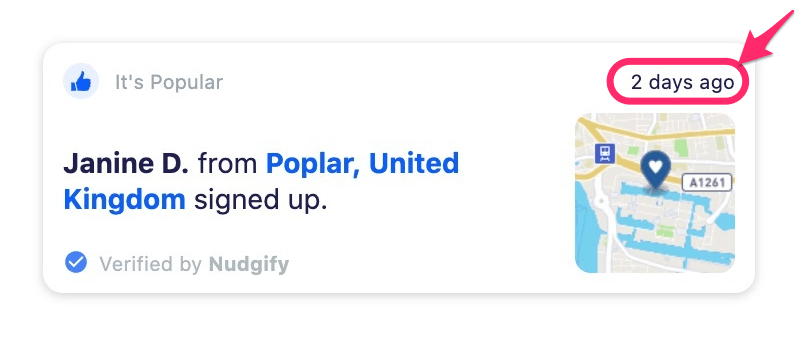
Hide the time for visits, purchases, sign ups, or reviews older than…
The “Hide Time if older than” option lets you hide the time stamp on your Social Proof Nudges when the activity is older than the time period you set.
This means the Nudge will still appear, but the time label such as “5 minutes ago” or “2 days ago” will not be shown if the activity is older than your chosen limit.
For example, if you set the limit to 1 week, Nudgify will:
- Show the time stamp for activities within the last week
- Hide the time stamp for activities older than 1 week
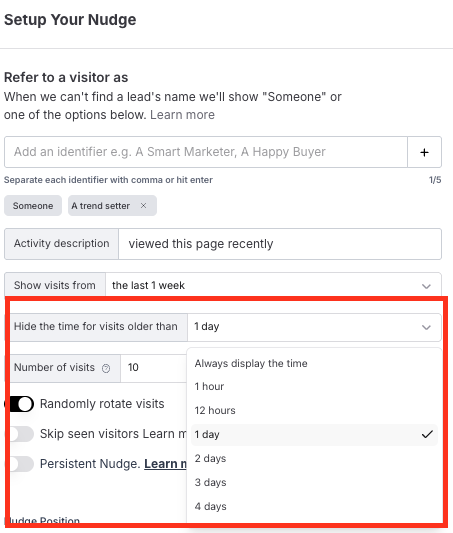
This allows you to keep showing all your sign ups, purchases, reviews, or page visits, while only displaying the time information when it is recent.
Where can I select the Hide Time option?
You can find this option when you add or edit one of the following Nudges:
Navigate to your Streams page, and click on the Stream for which you want to add/edit Nudges. Click the “Add Nudge” button, or click on a Nudge to edit it. See the full instructions on how to add and edit your existing Nudges.
By default, the time stamp on Nudges is hidden for:
- Visits older than 1 day
- Sign-ups/Purchases/Ticket Sales older than 1 week
- Reviews older than 1 month
