.png)
Advanced Styles
In addition to the Essential Styles, paid plans give you access to all the Advanced Styles to customize the appearance and behaviour of your Social Proof Nudges to match your brand. Advanced Styles allow you to adjust every aspect of your Nudges to make sure your notifications seamlessly suit your website and the way you want to talk to customers.
With Advanced Styles, you can change the animation style of your Nudges, set custom timings, loop Nudges, and let your visitors close Nudges. You can find and adjust the Advanced Styles on your Site Settings page.
Select An Animation Style
Advanced Styles allow you to adjust the way your Nudges appear by choosing which kind of animation to use. You can find this option in the ‘Appearance tab’.

Adjust Timings
In the ‘Behaviour’ tab, you can adjust how long Nudges show, how quickly they appear after one another and add an of initial delay to your Nudges.
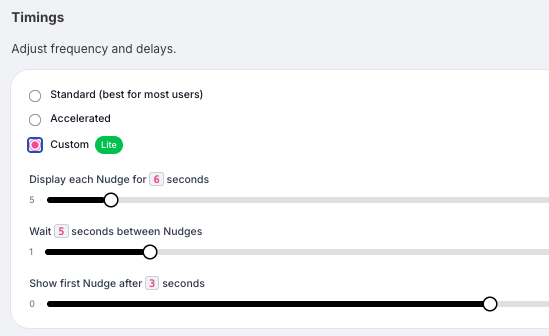
- Standard timings show the first Nudge after 3 seconds. Each Nudge stays visible for 6 seconds, with a 5 second gap before the next one appears.
- Accelerated timings shorten all Standard timings to 75 percent of their original length, so Nudges appear and rotate faster.
- Custom timings allow you to set your own values for how long a Nudge is displayed, the delay before the first Nudge appears, and the time between Nudges.
Loop Nudges
You can decide whether you want to put a Stream on repeat by toggling the “Loop Nudges” button. Loop Nudges means that, after all the Nudges in your Stream have shown on your page, it will ‘loop’ around again and the Stream will show again.

Close Nudges
By toggling the “Close” button, you can decide whether you want to give customers the option to close your Nudge. If you toggle the button on, a cross will show in the top right corner of the Nudge when visitors hover over it.

