.png)
When Does Nudgify Reset My Monthly Impressions?
Your monthly impressions limit resets on a rolling monthly basis. This means your limit doesn’t necessarily reset on the 1st of every month; instead, it resets based on the date you originally started your paid subscription.
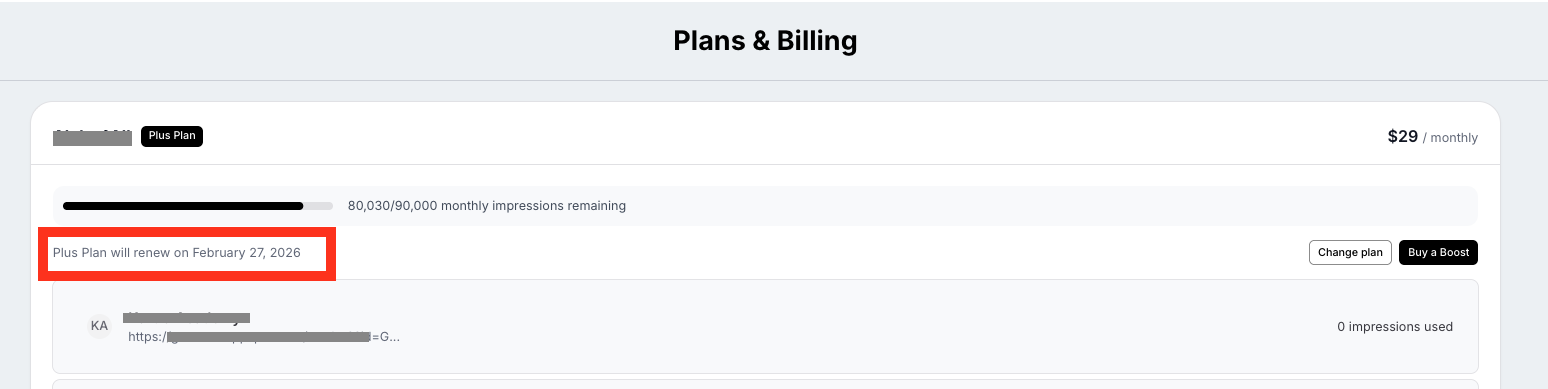
How to Find Your Reset Date
You can easily check exactly how many days you have left in your current cycle:
- Click on your Profile Icon in the bottom left corner of your Nudgify dashboard.
- Select Plans & Billing.
- Under your current plan details, you will see your Reset Date and a progress bar showing how much of your monthly traffic you have used so far.
What happens if I hit my limit before the reset?
If your website is having a high-traffic month and you hit your limit early, your Nudges will temporarily pause until your reset date.
💡 Pro-Tip: If you don't want your Nudges to stop, you can Buy a Visitor Boost for a one-time credit top-up, or upgrade your plan to increase your monthly allowance instantly!
